
What are Nulls Brawl Mods? Check Installation Guide on Android
Greetings, brawlers. A lot of you have tried Nulls Brawl with unlimited gems, maxed brawlers, and your favorite skins. But have you ever experienced it with custom visuals like Minecraft-style pixel graphics, or custom brawlers such as maids or Tokyo Ghoul characters? Some of you may have seen these in other Brawl Stars mods like Maid Brawl, Ghoul Stars, Classic Stars, and more. But did you know that you can enjoy these same features in Nulls Brawl as well? Mod creators also release asset patches for Nulls Brawl, which allow us to add custom backgrounds, characters, and features into the game.
There are several challenges when it comes to finding and installing these assets. First, many players are unaware of the different types of Nulls Brawl assets available. Second, they don’t know where to download these asset files. Third, they are unsure how to properly install them in Nulls Brawl. I personally faced a few issues while installing them for the first time. So, we’re here to help. To make things easier for everyone, we’ve created this guide to help you find the asset files and install them successfully.
About Nulls Brawl Assets
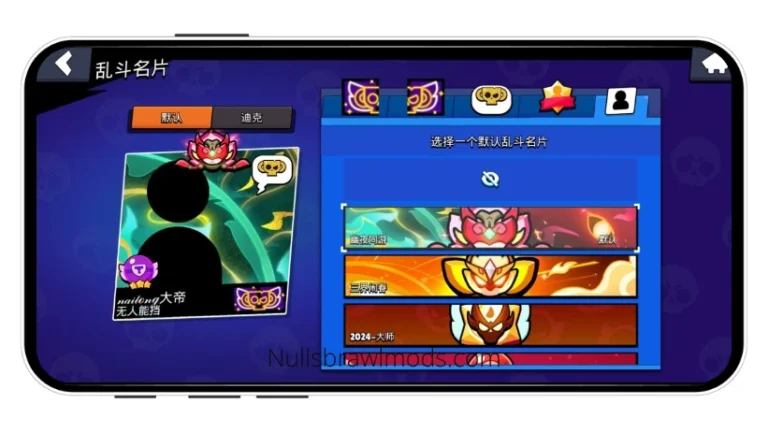
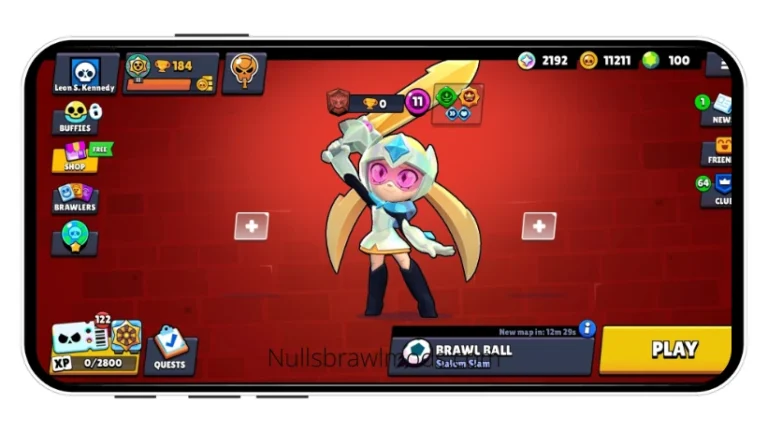
Basically, Nulls Brawl Assets are patch files that are used to modify different in-game elements like brawler models, skins, visual effects, sound effects, music, text styles, backgrounds, themes, and more in Nulls Brawl. They allow players to bring in new content created by various mod developers directly into the game. These files usually come with the “NullsBrawlAssets” extension and are specifically designed to work only with Nulls Brawl. For example, Minecraft.NullsBrawlAssets changes the game’s visuals into Minecraft-style block and pixel graphics, China.NullsBrawlAssets adds the Constellation skin pack exclusive to the China server, and GhoulStars.NullsBrawlAssets replaces default brawler models with Tokyo Ghoul and Dota 2 characters. There are many more such assets available as well.
Importantly, these asset patches only modify the game files locally on the user’s device, meaning the changes are visible only to the person using them. Other players cannot see these modifications. This allows each player to customize their Nulls Brawl experience based on their own preferences while still playing together on the same servers. For instance, one player might see Ghoul-themed brawlers while another sees Maid-style characters, yet both can play in the same match without any issues.
List of All Assets Available
At present, there are hundreds of NullsBrawlAssets available that can be added to Nulls Brawl. Some of the popular ones include:
China Skin Assets – Adds exclusive skins, pins, sprays, and profile icons from the China server
Ghoul Stars Assets – Introduces Tokyo Ghoul and Dota 2 characters, custom lobby background, Unravel BGM, and more
No Outline – Removes the outline effect from visuals
Minecraft Assets – Transforms the game into a Minecraft-style environment with pixelated graphics
HDR Brawl Assets – Enhances visuals with HDR graphics and additional effects
and many more!
Guide to Install NullsBrawlAssets file in Nulls Brawl on Android
Installing the NullsBrawlAssets file is a complicated process if you are doing it for the first time, which depends on your device. To make it simple and easy to install the assets, we have written down the step-by-step installation procedure. During the first time installation, some users may face some common issues at certain steps, so we have also shared the solution in those steps, along with links to detailed explanations. The steps are as follows:
- First, make sure you have Nulls Brawl installed on your device. If you haven’t, then download & install Nulls Brawl first before proceeding to the next step.
- Second, download the “xyz.NullsBrawlAssets” file you want to install.
- Then, open the file manager and navigate to the folder where the Assets file is stored.
- Once you find the Assets file, tap on it.
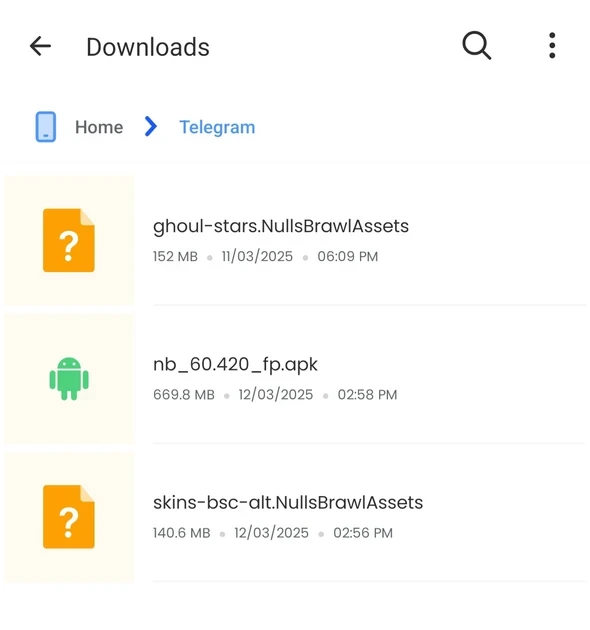
- Now, it will show you a list of apps with which to open the downloaded NullsBrawlAssets. [Note: If no list is opened or device says – “Unsupported file”, then use another File Manager and not the built-in File Manager. Read this common issue for detailed info.]
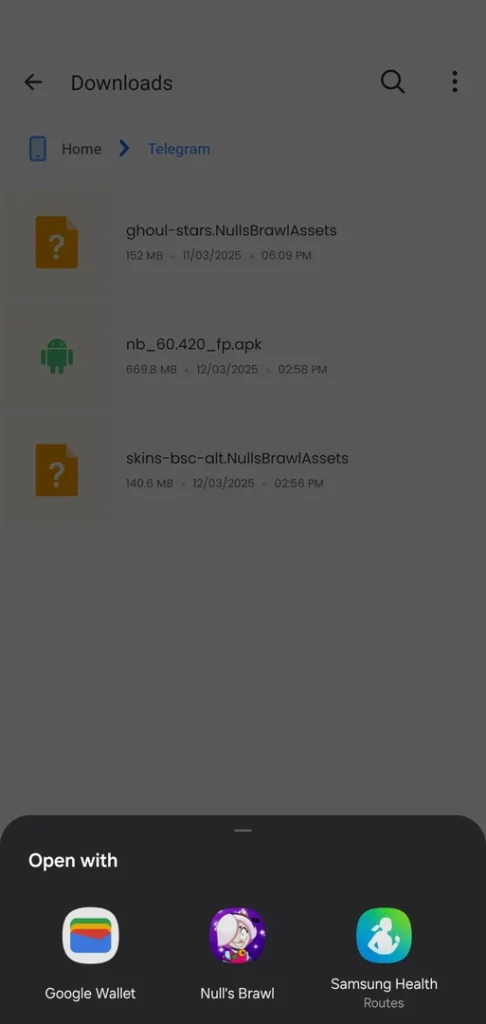
- From that list, select the Nulls Brawl. [Note: If Nulls Brawl is not shown in the list, then another File Manager and not the built-in File Manager. Read this common issue for detailed info.]
- Then, the Nulls Brawl will open the assets file in its installer as shown in the following screenshot.
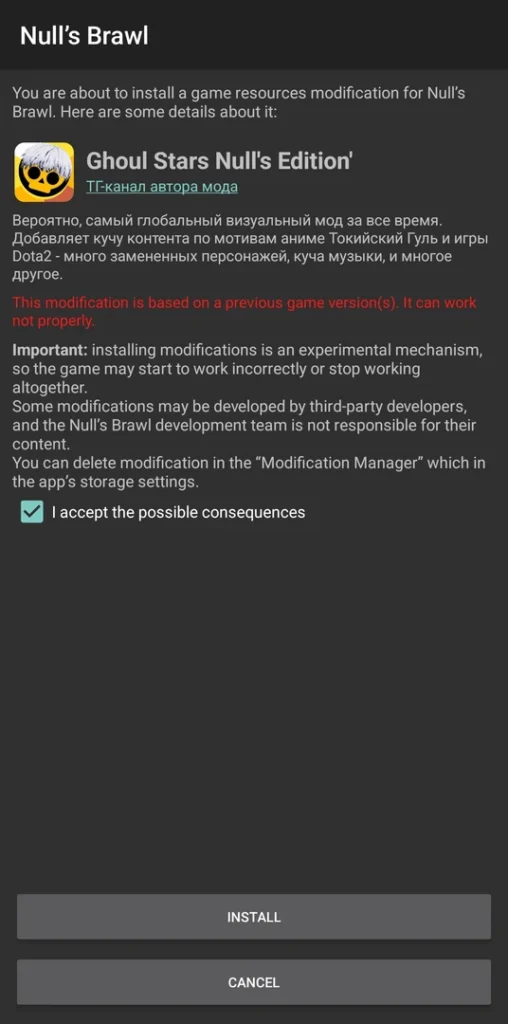
- Now, tick the check box that you agree to install the assets, and then tap on the Install button.
- After that, it will install the xyz.NullsBrawlAssets in the Nulls Brawl and will be completed in a few seconds.
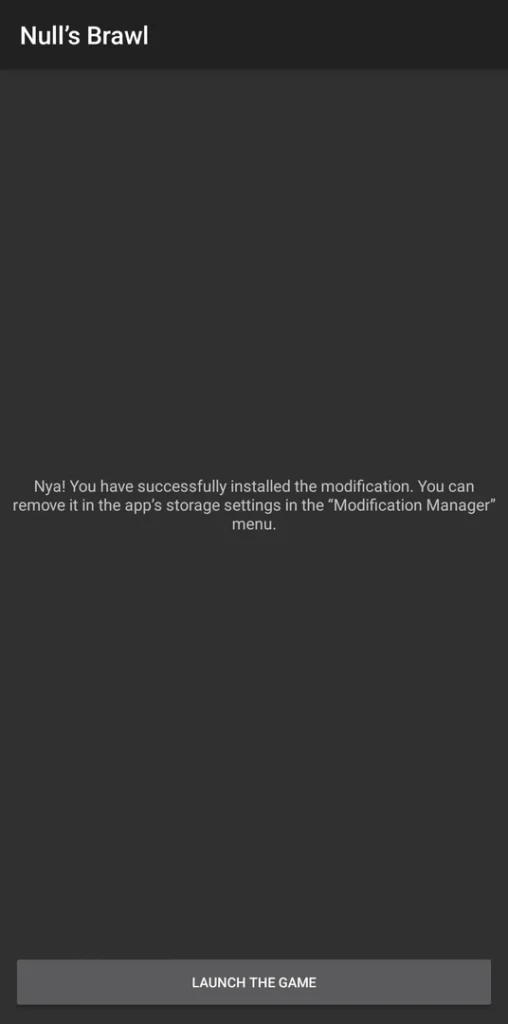
- Now you can launch the game. [Note: If the assets patch didn’t work after installation, check whether the assets version is the same as Nulls Brawl version, and if not, then update the assets. Read this common issue for detailed info.]
Guide to Uninstall NullsBrawlAssets Patches
Removing Nulls Brawl Assets is not the same as uninstalling a regular app. To remove them, you first need to open the Nulls Brawl Modification Manager and then delete them from the User Modifications section. The steps are given below—follow them carefully one by one to successfully remove any installed assets.
Step 1: Open Modification Manager of Nulls Brawl
- To uninstall xyz.NullsBrawlAssets, first, we need to open the Nulls Brawl’s Modification Manager.
- To do that, tap and hold the Nulls Brawl icon and open its App Info.
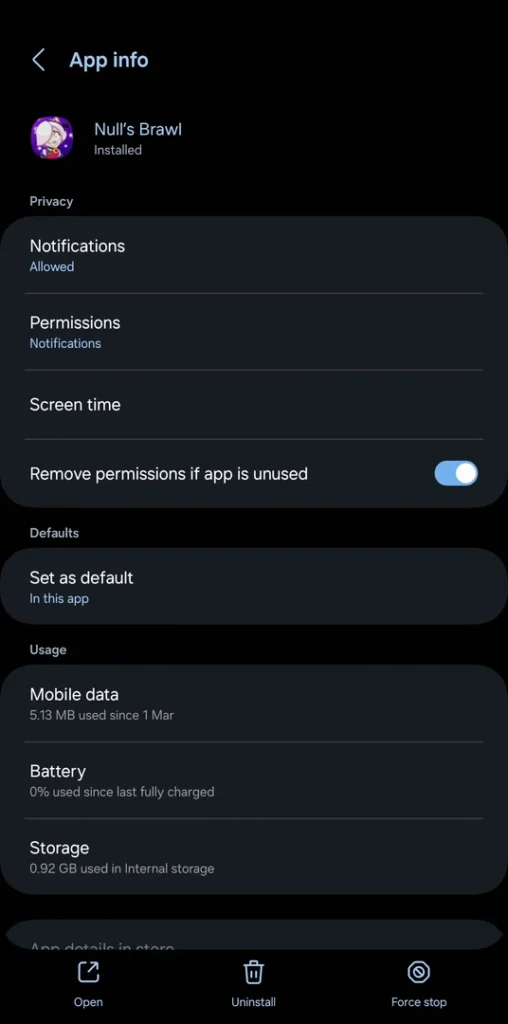
Next, tap on the “Storage” or “Storage Usage” option.
After that, select the “Clear Data” or “Manage Space” option. (The option may vary depending on the device, but both function the same way.)
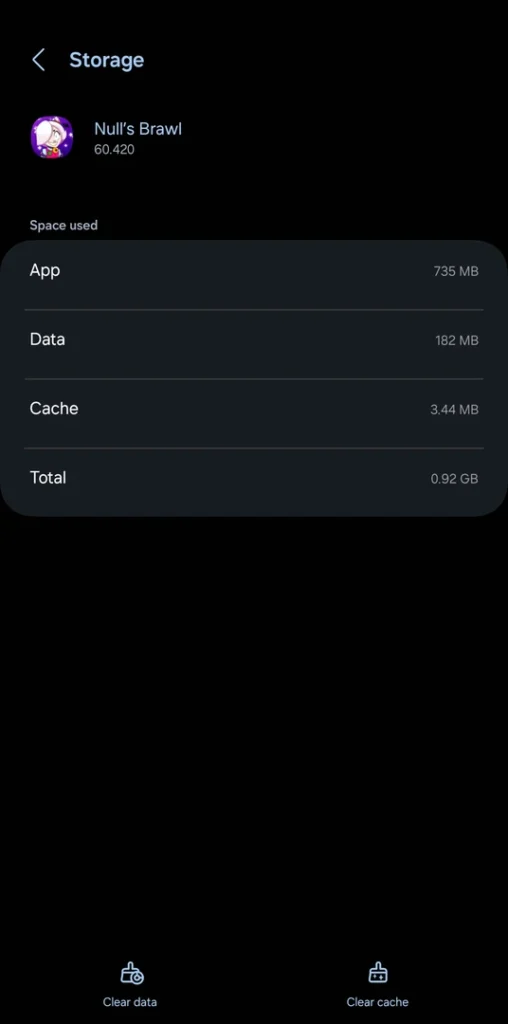
- At this point, the Nulls Brawl Modification Manager will open. From here, you can manage all installed asset patches, including game resource patches and user-installed patches, as well as enable, disable, or remove them.
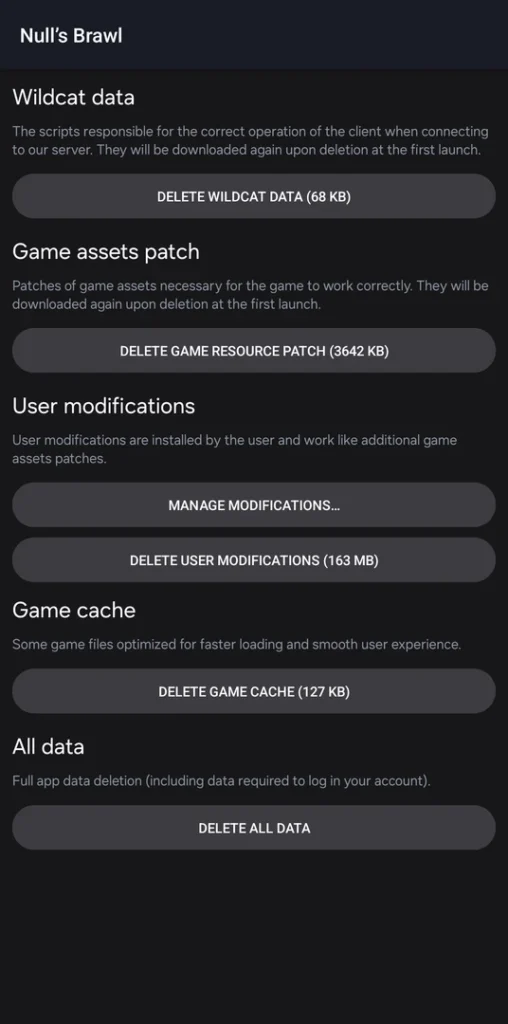
Step 2: Go to User Modifications and Uninstall the Desired Patch
- Under the User Modification section, you will see “Manager Modifications” option. Tap on it.
- Here, it will show all user-installed Assets patches.
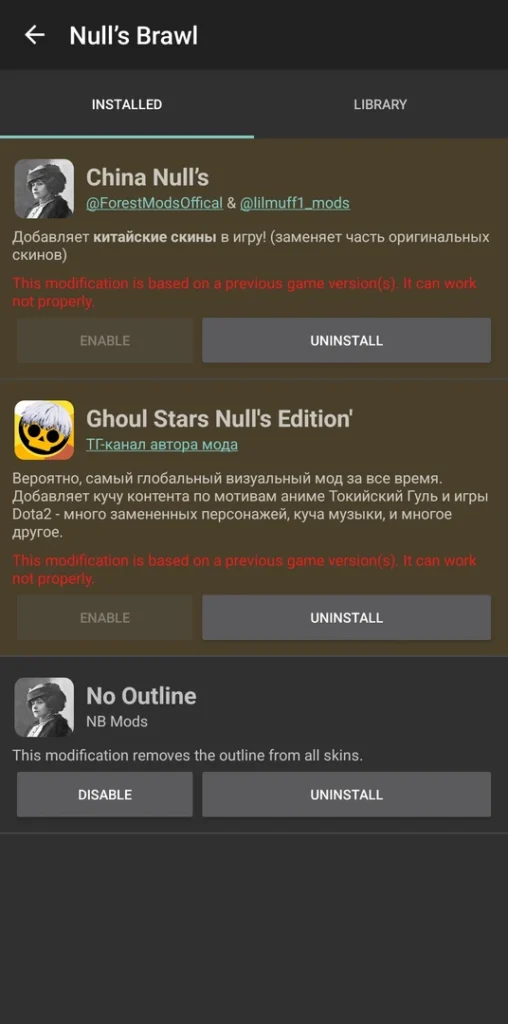
- From the list, tap the Uninstall button under the Assets you want to remove.
- Done. The patch will be uninstalled as soon as you tap the uninstall button.
Guide to Uninstall NullsBrawlAssets Patches
When attempting to install the NullsBrawlAssets file and going through user comments on forums and other platforms, I came across three common issues. First – unsupported file type, second – no option to open the file with Nulls Brawl, and third – assets installed but not working. I personally experienced the first two issues during my initial attempt, and later, after a new version of Nulls Brawl was released, I encountered the third issue as well when the assets failed to work. But that wasn’t all. I also realized that no one had clearly explained how to fix these problems. And when I finally figured out the solution, I couldn’t help but laugh at how simple it actually was.
We don’t want you to go through the same trouble. So, the fix for the first two issues is to use a file manager other than the default built-in one, while the solution for the third issue is to keep the assets version updated according to the Nulls Brawl version. Below, we’ve explained each of these problems along with their solutions in detail—check them out if you run into any of these issues.
Unsupported File Type
Typically, the default File Manager on most Android devices does not recognize Nulls Brawl as an app capable of opening NullsBrawlAssets files. As a result, whenever you try to open them, it simply displays “Unsupported File Format.” In some cases, certain file managers are unable to identify which app should open these files and fail to detect Nulls Brawl, showing a message like “You don’t have any apps that can open this type of file. You can search for one in the Play Store.” We tested this on Samsung, MI, and Redmi devices, and none of them were able to open the NullsBrawlAssets files. We also tried using ‘Files by Google,’ but it did not support them either.
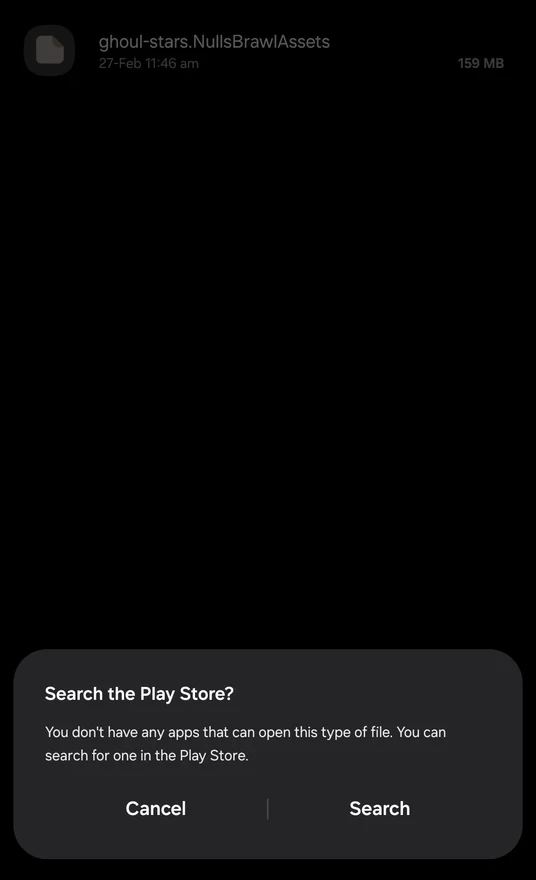
Solution: To solve it, you have to download another File Manager (by Imagination AI or Galaxy Studio Apps) app from the Google Play Store. One Plus’s built-in File Manager can open it, so One Plus users don’t need any other file manager.
Nulls Brawl not shown in Open With options
Files with the NullsBrawlAssets extension can only be opened & installed with Nulls Brawl. So, if you haven’t installed Nulls Brawl, please install it first.
Now, if the Nulls Brawl is already installed and you still didn’t get the Nulls Brawl option to open the assets file with, then the issue is with the file manager. Some in-built managers do try to open the NullsBrawlAssets file, and show some apps to open with, but the list doesn’t show Nulls Brawl (which we need). In this case, the file manager doesn’t determine the Nulls Brawl as an app that can open this type of file.
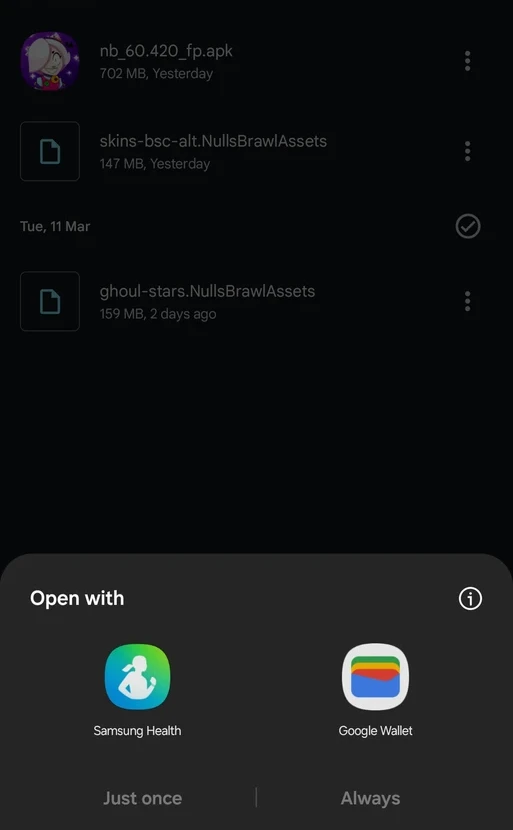
Solution: Since the issue is with the device’s built-in file manager, we need to use another File Manager (except Files by Google). Many File Managers on the Play Store can open the assets file with the Nulls Brawl. Download any file manager you like, and try again. If you face the same issue, then try with another file manager. We used File Manager by Imagination AI and Galaxy Studio Apps, and they both worked in opening the assets file with Nulls Brawl. You can use them too.
Assets Installed but Not Working
Several players were able to install the asset patch successfully, but later reported that it didn’t work and the game remained unchanged. This usually happens because the asset version must match the Nulls Brawl version. If the NullsBrawlAssets file belongs to an older version, it won’t function properly with a newer version of Nulls Brawl.
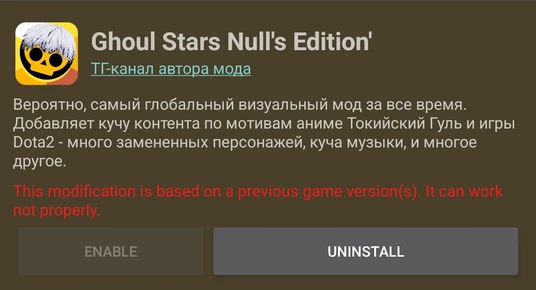
Solution: Always install the same version of the Assets file as the Nulls Brawl. After each Nulls Brawl update, download and install the newer version of the Assets files, too.
Wrapping Up
In conclusion, Nulls Brawl Assets are patch files used to add extra modifications to Nulls Brawl. For example, features like Constellation skins, Tokyo Ghoul characters as default brawler models, no outlines, Minecraft-style graphics, HDR visuals, custom music, and more can be added using their respective NullsBrawlAssets files. However, the main problem during installation is the built-in file manager on Android devices, which cannot open these asset files or identify the correct app to install them, preventing them from opening in Nulls Brawl. This issue can easily be fixed by using a third-party file manager from the Play Store. That’s all there is to it. We hope this guide helps you download and install asset files without any trouble.
Frequently Asked Questions
What are Nulls Brawl Assets?
Nulls Brawl Assets are special files for the Nulls Brawl game that are used to add or modify in-game content such as brawler models, music, themes, graphics, and more. These files come with the “NullsBrawlAssets” extension in their name.
How to install Nulls Brawl Assets?
To install the assets, tap on the NullsBrawlAssets file and open it using Nulls Brawl. This will take you to the game’s Assets Installer. From there, accept the conditions and tap the install button to add the assets into Nulls Brawl.
Can I use more than two assets in Nulls Brawl?
Yes, you can use more than two assets as long as they do not modify the same in-game content. If two asset files change the same element, such as brawler models, they may conflict. In such cases, the most recently installed asset will work, or sometimes none of them will function properly.
Why is the NullsBrawlAssets file not opening?
The built-in file manager on Android devices often cannot identify which app should open files with the NullsBrawlAssets extension. Because of this, the files fail to open. To fix this, you should use a third-party file manager available on the Play Store.
Can I use NullsBrawlAssets with other Brawl Stars mods?
No, these asset files are designed specifically for Nulls Brawl and cannot be used with other mods. However, many of these assets are originally based on content from other mods, so you can still try those mods separately.
Why are the NullsBrawlAssets not working?
If the installed assets are not working, the issue is usually related to version compatibility. Make sure the asset version matches your Nulls Brawl version. If it already matches, try clearing the game’s data and reinstalling the assets.
Why is my phone not showing Nulls Brawl when opening the file?
This happens because the file manager cannot detect that Nulls Brawl supports this file type. Installing a third-party file manager from the Play Store should solve the problem and allow you to open the assets file with Nulls Brawl.